
Free Code 39 Font for Excel
A no-cost Code 39 barcode font made for spreadsheets. It sizes well inside Excel cells and works without macros or add-ins.
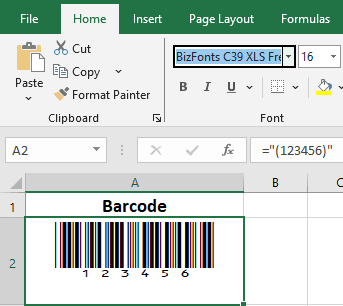
About the Free Font
This font is supplied by BizFonts.com and is the same file offered there. Use the button above to download from BizFonts.com; the zip is stored on this site, so it also works when these pages are opened from a local drive. It contains the BizFonts C39 XLS font as a TrueType and an OpenType file, plus a short PDF user manual.
Code 39 is a self-checking linear symbology that encodes numbers, capital letters and a few symbols, which makes it a common choice for inventory tags, asset labels and badges. The free font may be used personally, by nonprofits, and by organizations with annual revenue under $500,000. Larger organizations need a license.
Create Code 39 Barcodes in Excel
- Extract the zip and install the font, then restart Excel (or the computer) so the new font is listed.
- Keep the raw data in one column, for example cell A2. In the next column add the start and stop characters with a formula such as
="*"&A2&"*". Parentheses work in place of the asterisks when you do not want the asterisks to print in the human readable text:="("&A2&")". - Select the formula cells and set the font to the free Code 39 font. A size of 12 or 16 points works well; adjust the row height and column width until the symbol is fully visible.
- Fill the formula down to cover every row that needs a barcode, then verify a printed sample with a scanner.
What the Licensed Fonts Add
The free font is a single size and does not handle every character. The licensed Code 39 font package adds:
- Narrow fonts with a 2:1 bar ratio for tight labels and packaging.
- Clean encoding of the space character, with no substitute character needed.
- A range of font sizes, and an extra-small font sized for Excel cells with the text printed under the bars.
- Font encoders that calculate the optional MOD43 check digit and support Extended Code 39 for lowercase letters and symbols.
- Technical support from IDAutomation.
Be careful with other free barcode fonts. Barcode fonts offered as freeware or sold for very little are often counterfeit copies, and using or passing them on can create liability. Refer to IDAutomation's explanation of illegal fonts. For other symbologies, refer to the Universal font package or the free QR Code font.